Your coding agents. One searchable history.
Find a conversation across Claude Code, Codex, Gemini CLI and Grok Build without connecting a model. When you’re ready to run agents, use Ollama or LM Studio and follow their work in one place.
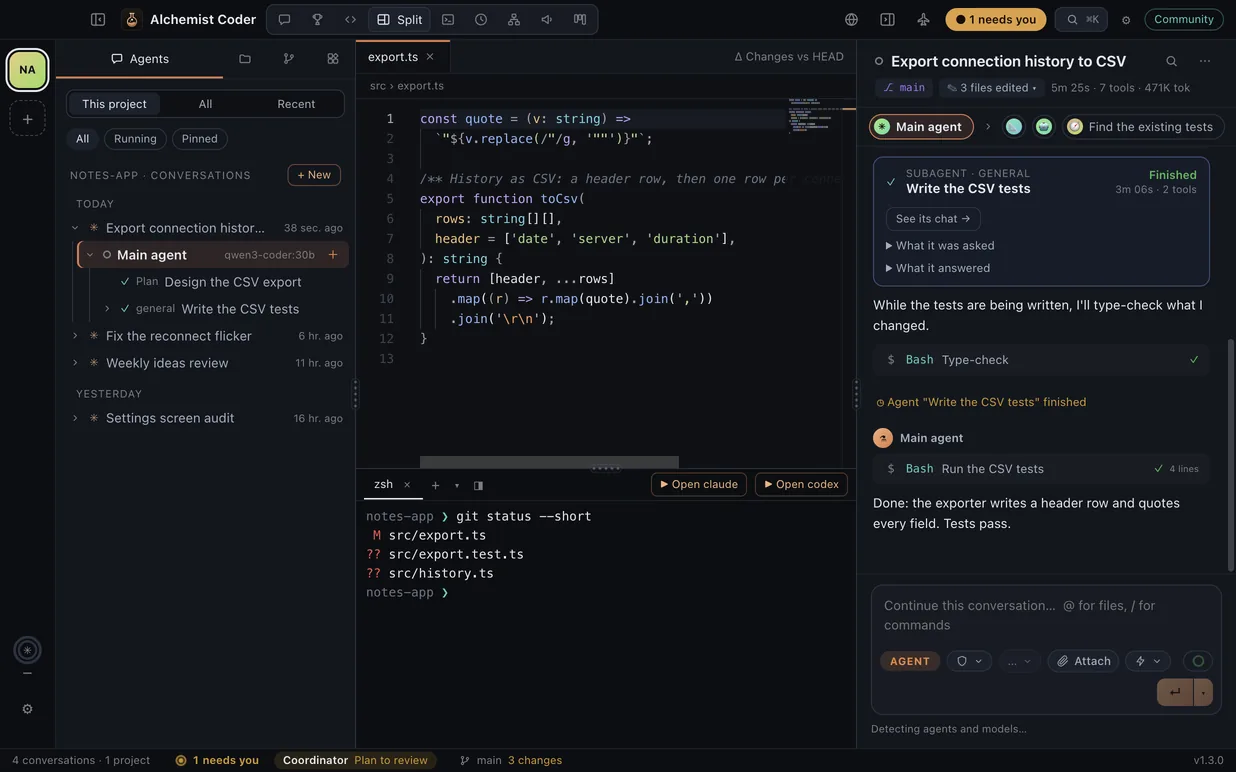
Code, terminal and agent, side by side.
The file the agent just changed, a terminal in the project with what isn’t committed yet, and the conversation next to them.
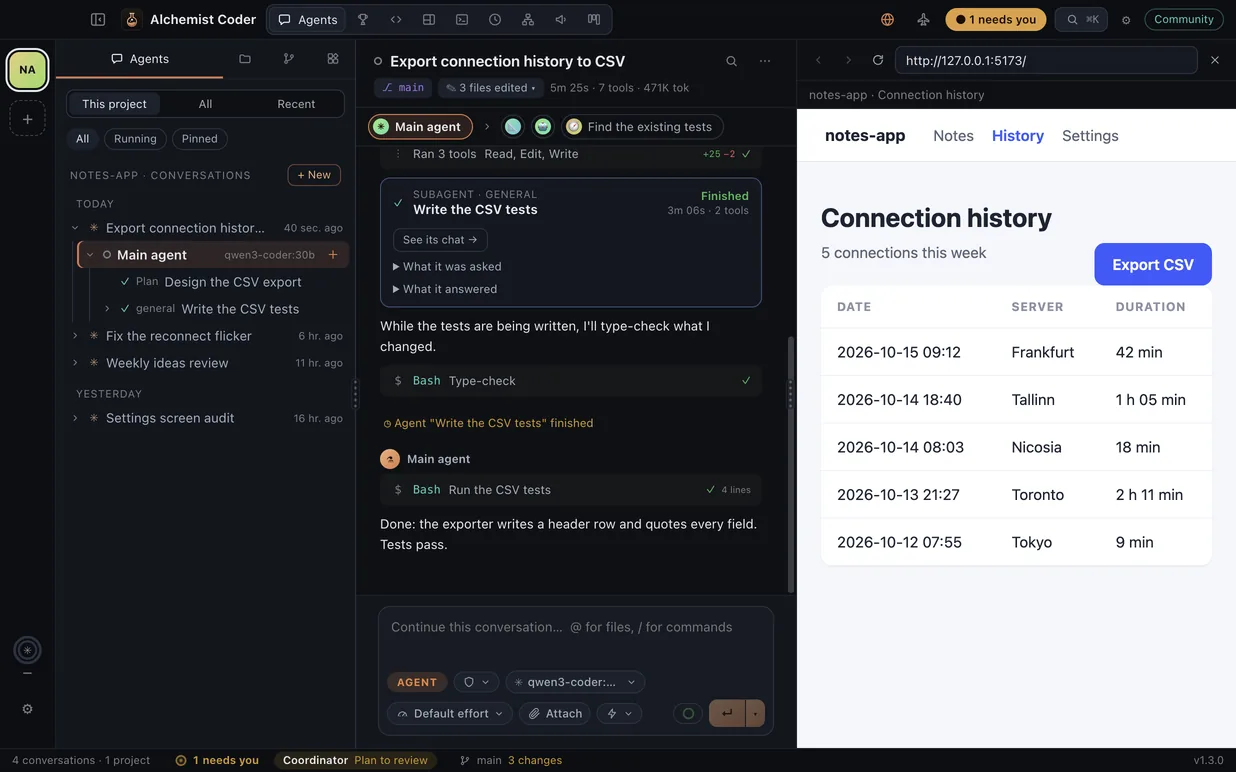
A browser your agents drive.
The project’s own page, next to the conversation. Agents open, read, click and type in it while you watch, and Take over makes them wait until you hand it back.
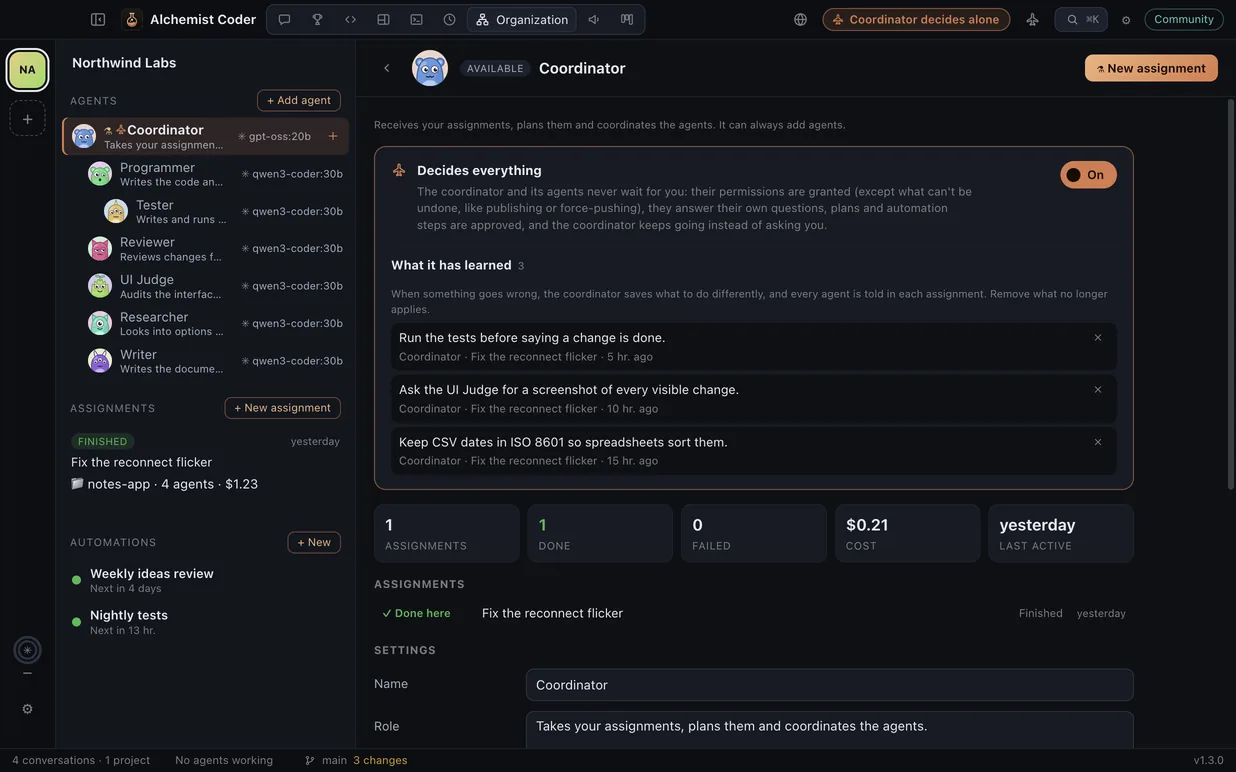
A coordinator that decides alone.
With Decides everything on, your organization never waits for you, except for what can’t be undone. After each mistake it saves a lesson that every agent reads.
Free Community · Mac, Windows & Linux
Download Community.
Install and get started · SHA256SUMS
Version 1.3.9 · Free Community edition, not signed by Apple or Microsoft yet. The first time on a Mac, click Done when macOS can’t verify it, then System Settings → Privacy & Security → Open Anyway. On Windows: More info → Run anyway.
Pro is on the way. Get an email
Give the organization a job
A simulation of the real interface, in your browser: write a job, approve the plan and watch the agents work. It doesn’t connect to any model.
 Alchemist Coder
Drag the cards between columns.
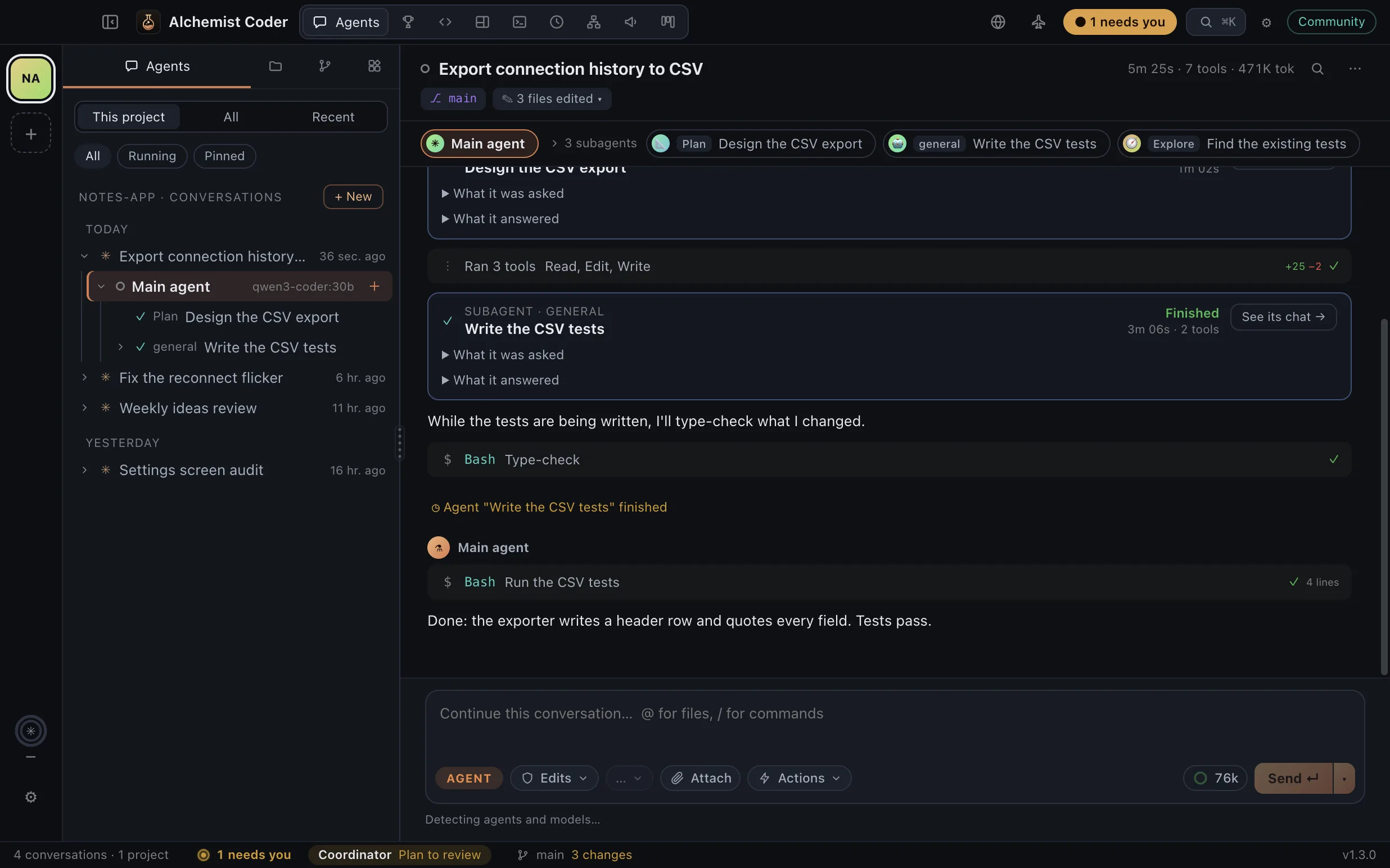
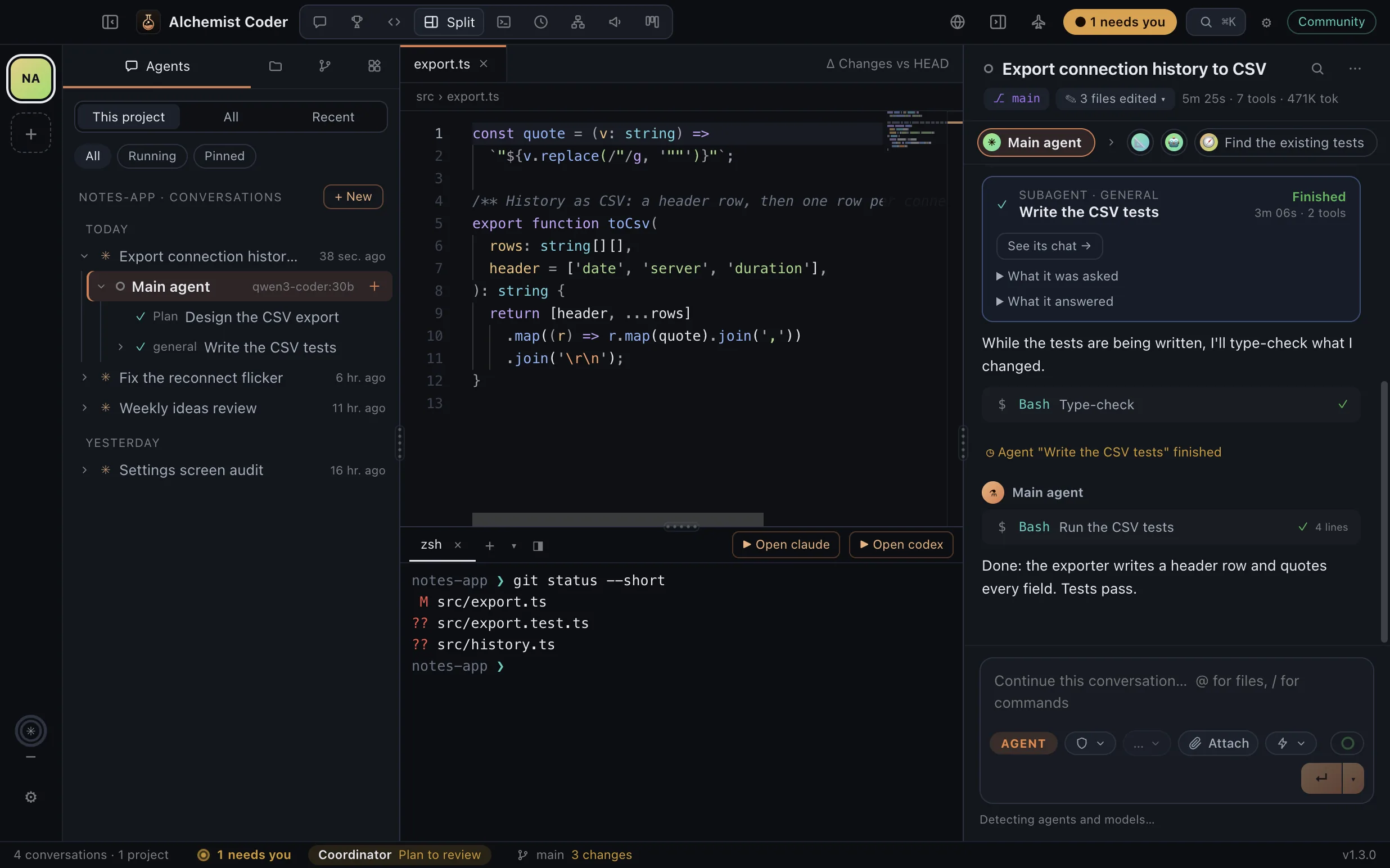
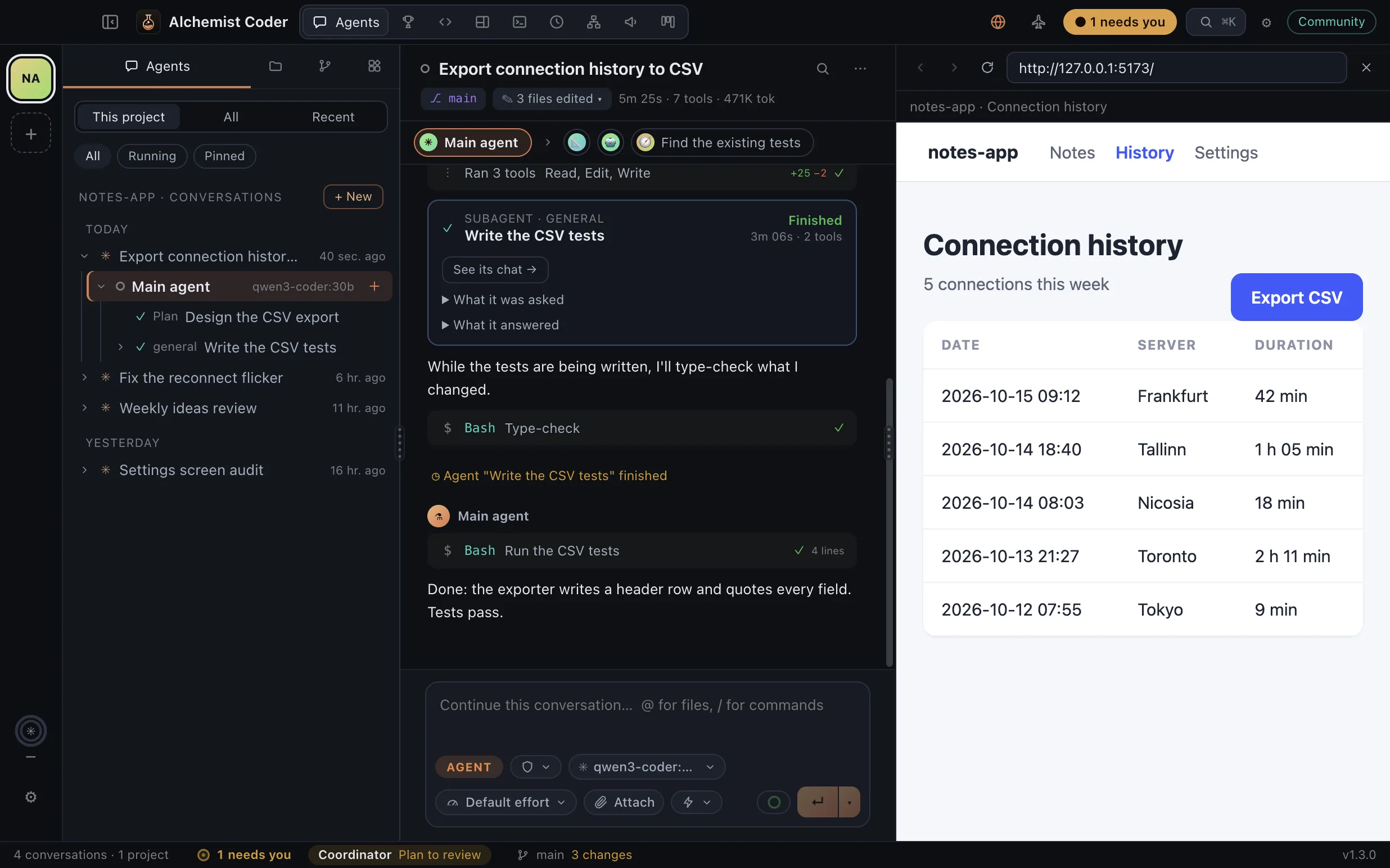
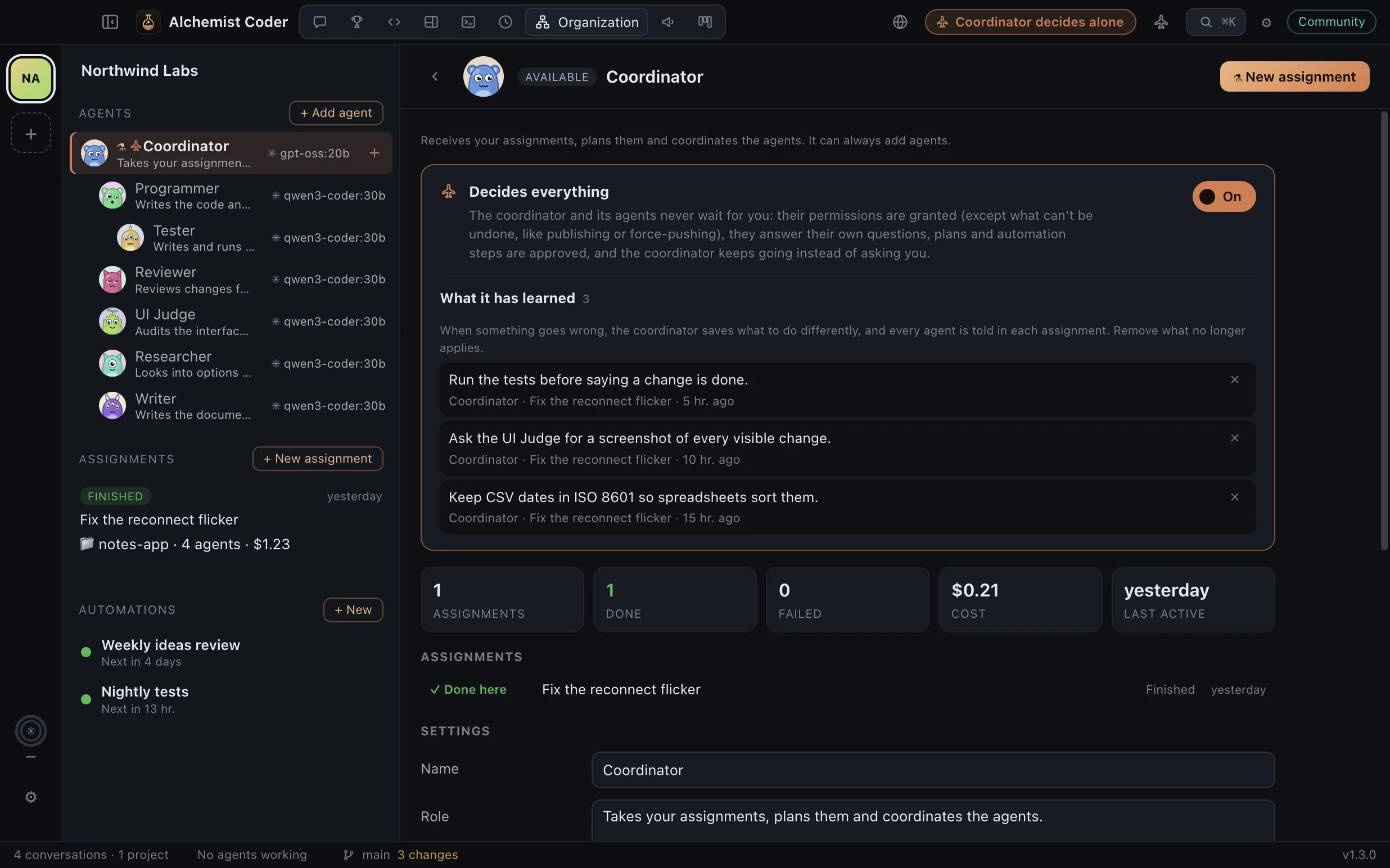
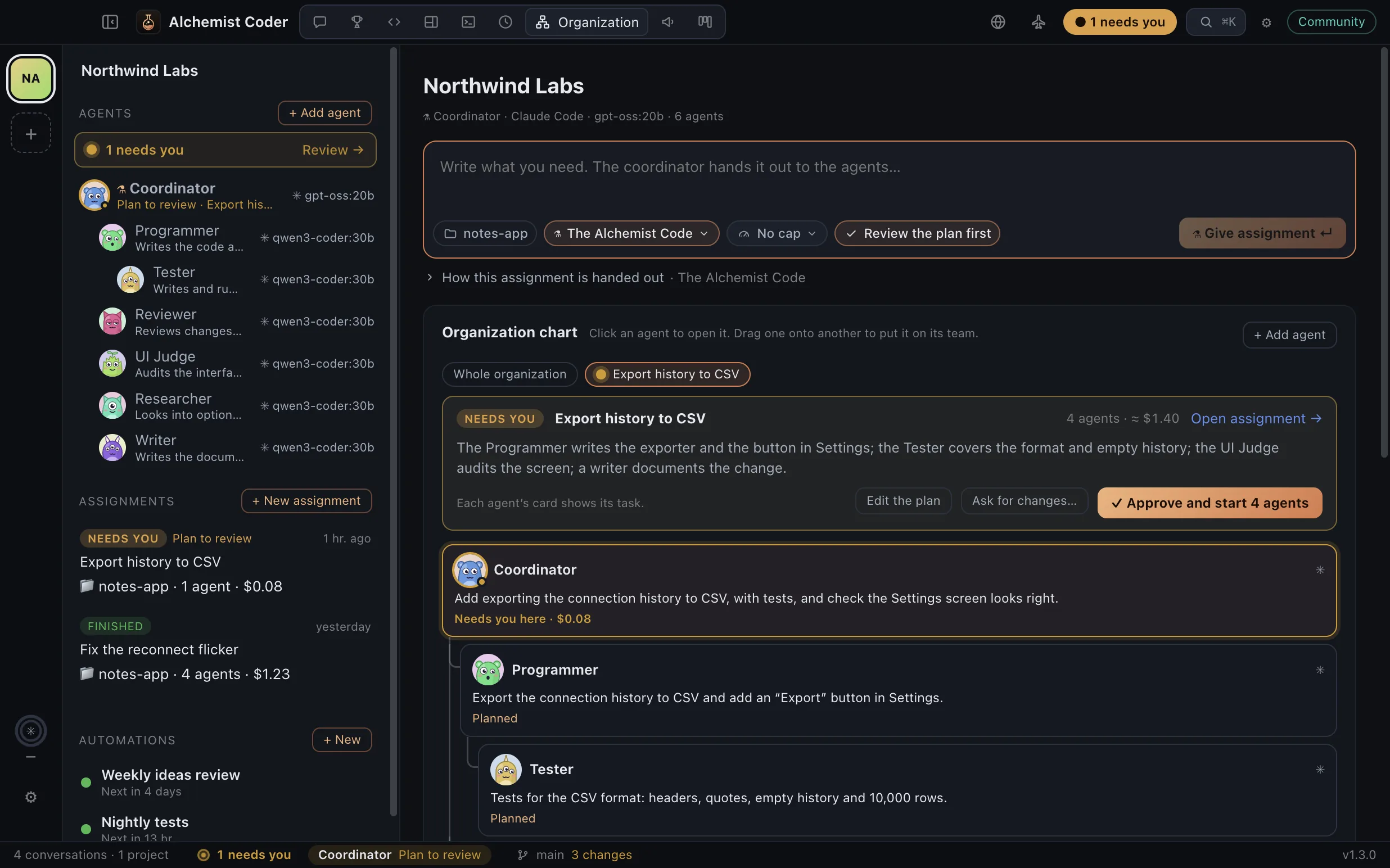
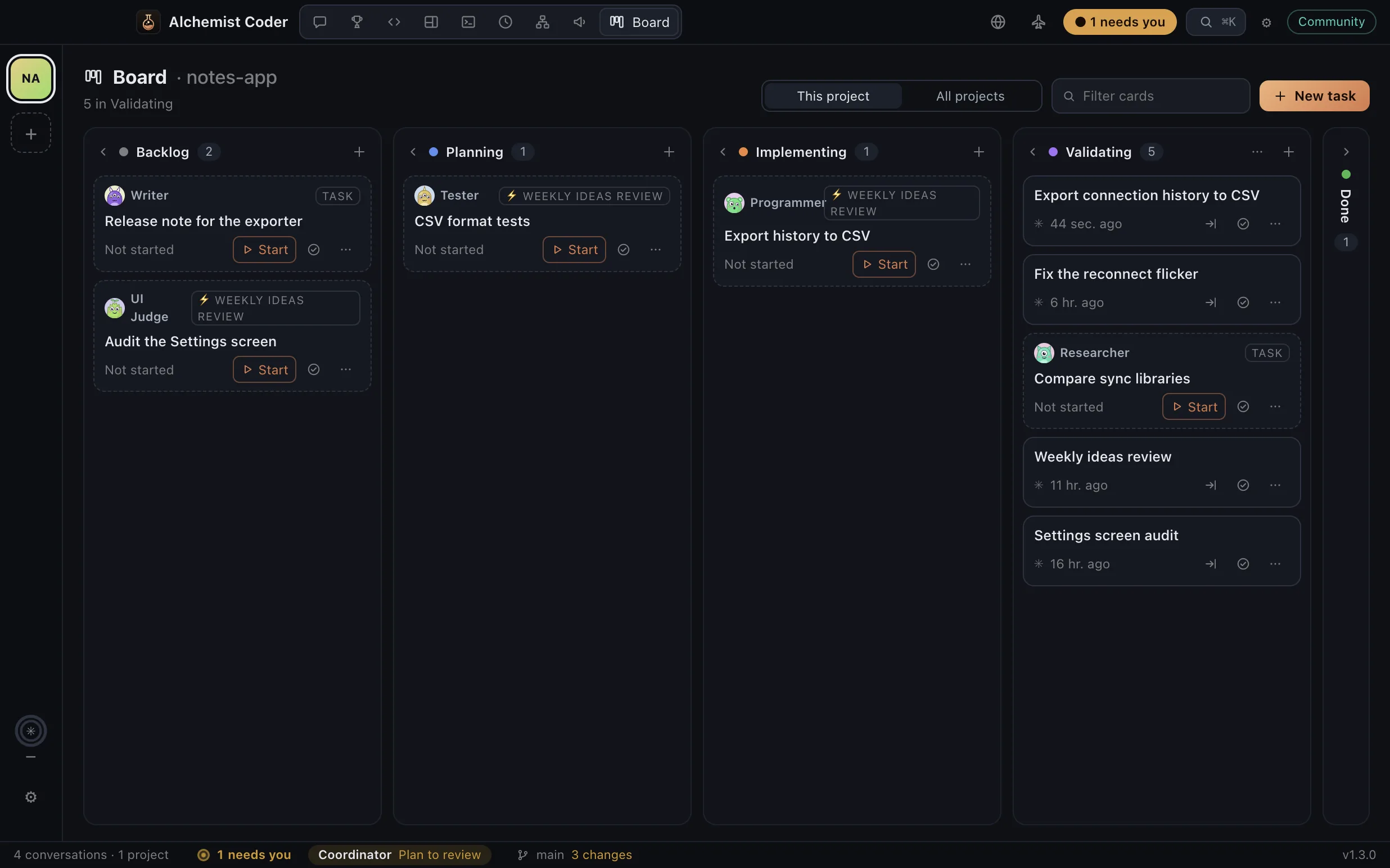
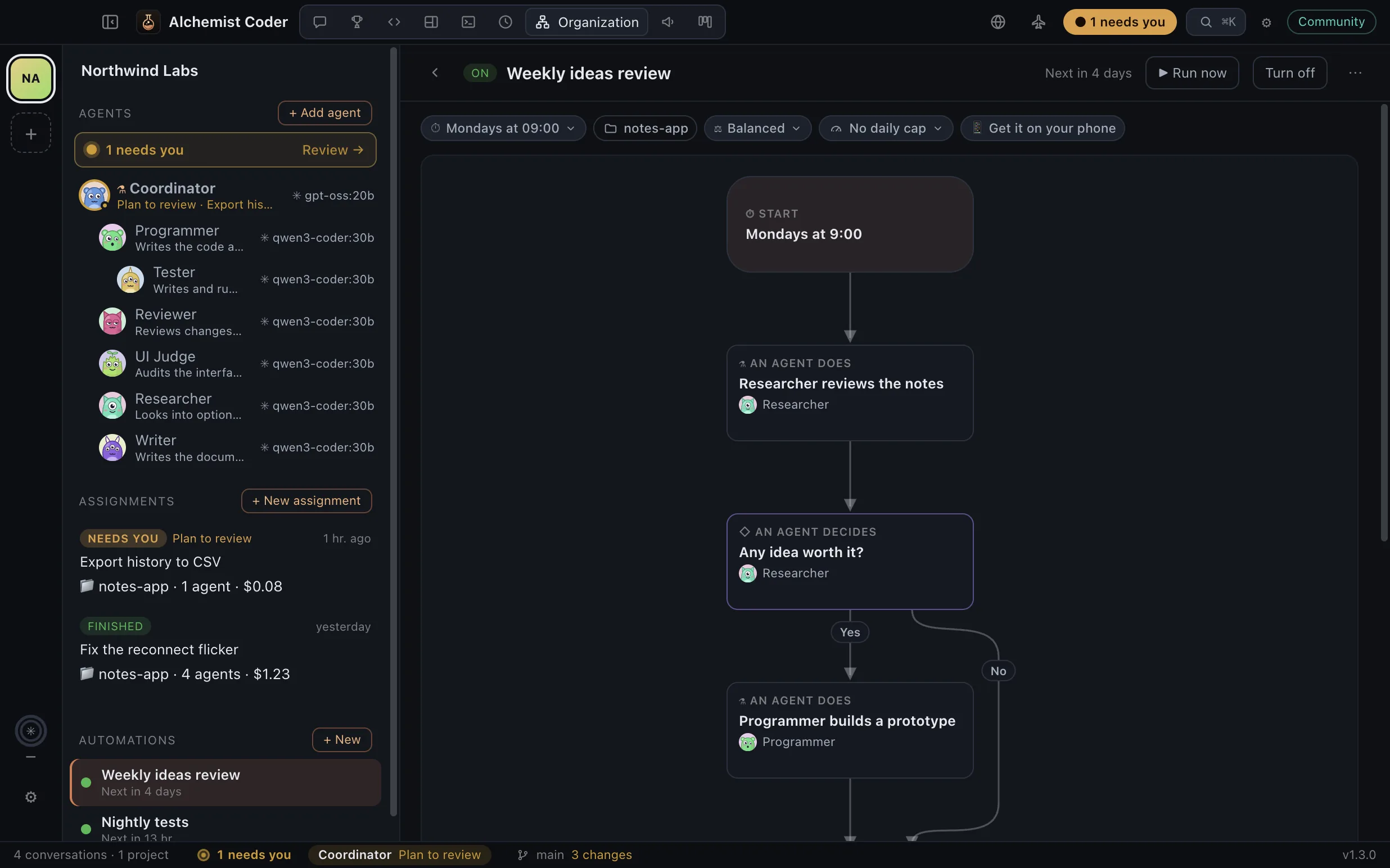
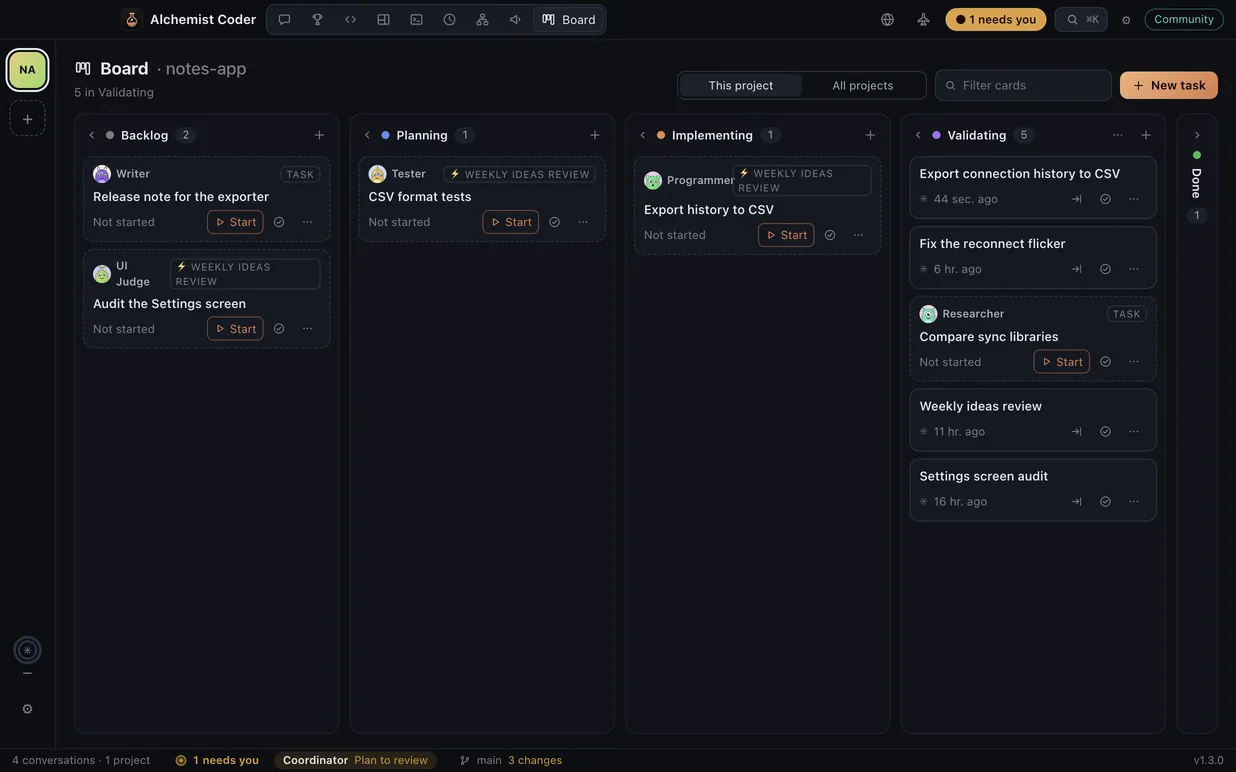
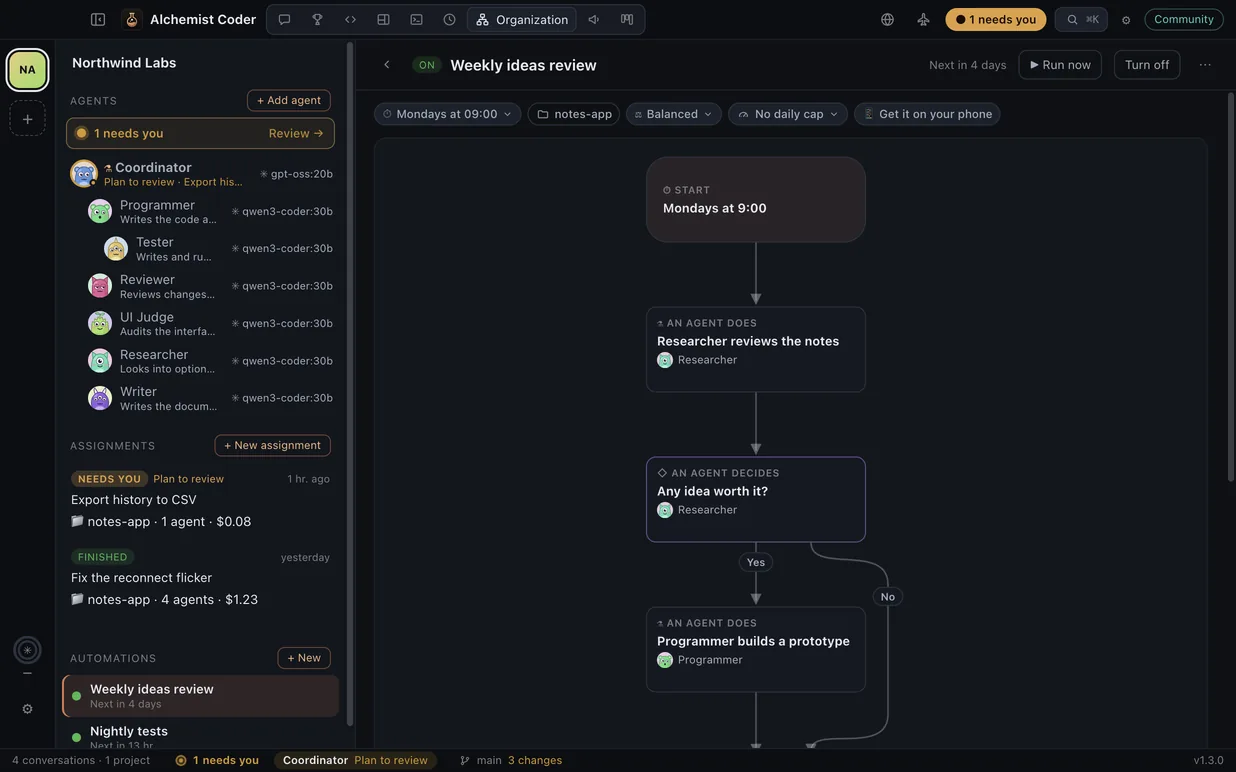
Real screens from Alchemist Coder 1.3, with a demo project and agents on local models.
Every agent and subagent, in its place.
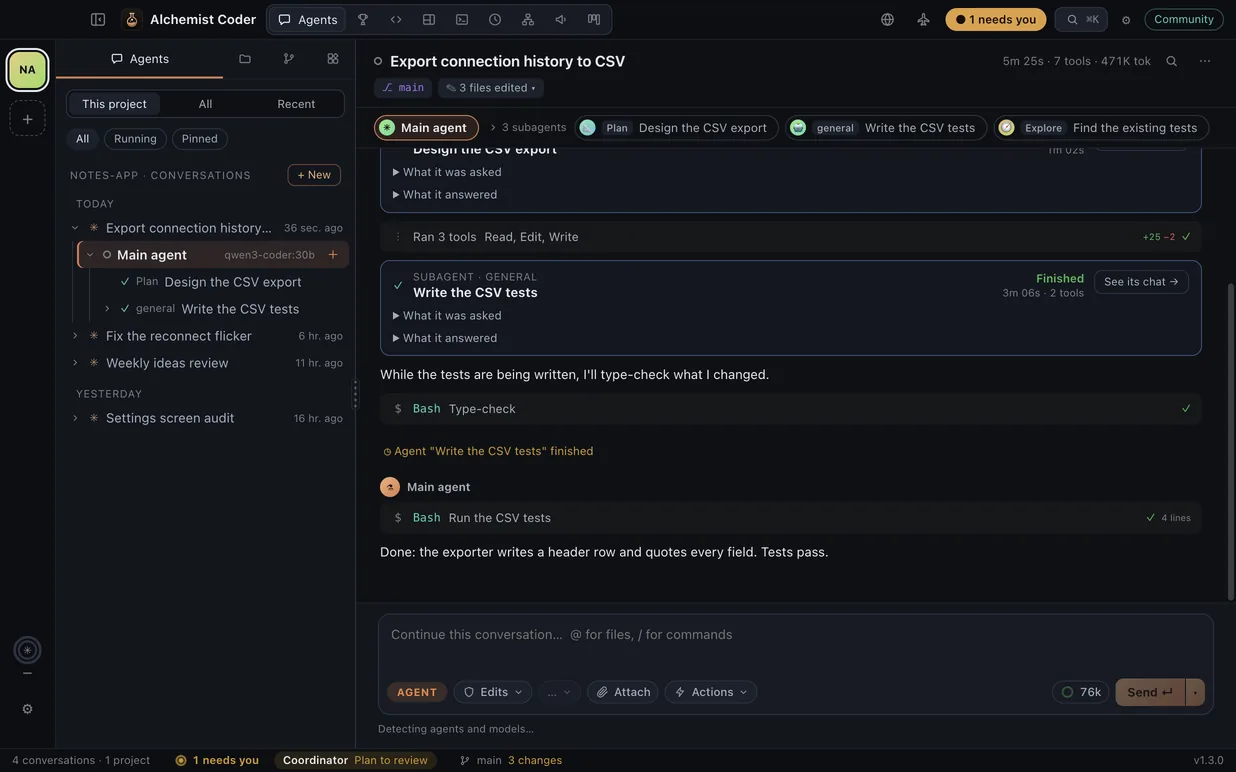
Your conversations are organized by project. Inside each one you see the whole tree: the main agent, the subagents it spawns, and the ones those spawn in turn. Click any of them to see exactly what it did.
- Live status: thinking, waiting for your permission, or done.
- Tokens, time and cost for every agent, not just the session.
- See which worktree and branch each agent worked on, and which files it changed.
- Large waves are grouped so the tree stays readable.
- Add an agent right in the tree: pick its type and task, and the main agent launches it. Take finished ones out of the list.
- Approve or deny each permission in the app, with a diff of the change.
- Answer an agent’s questions right in the chat: pick options, write your own answer, or skip.
- Review what an agent changed, block by block: keep it or undo it. Nothing gets committed for you.
- Arena: give one task to several agents, each on its own git branch, compare their changes and tests, and merge the best.
- Chips under the message box: agent or plan mode, permissions, model and reasoning effort, ready-made actions, and how full the context is.
- A Git tab in plain words: your branch, what is waiting to push or pull, what is not committed yet, and which commits came from an agent.
Your own agent organization.
A standing coordinator takes your assignments, proposes a plan you approve, and hands the work to the agents you add over time, each with its picture, role, model, permissions and projects.
- Write it once: give an assignment in plain words and the coordinator turns it into work for your organization. Nothing starts until you approve.
- See your organization as a chart: who reports to whom, who is working and who needs you. Drag an agent onto another team.
- Every agent gets its own little monster (or the picture you choose) and a role: a programmer, a tester, a reviewer, a UI judge… each on the projects you choose.
- Each assignment has its own chat, organized by agent and subagent, with a tab to follow each one while it works.
- The status bar and the Dock icon tell you who is working and what needs you. Gauges over the gear show how much of your Codex and Kimi Code limits you’ve used, and when a newer CLI is out.
- One “needs you” inbox for plans, permissions and agents’ questions, answered right there.
- Agents work in their own git copy of your project as it is now: you read the diff and apply it when you’re ready.
- Every agent keeps a record: its assignments, results, cost and exactly what it receives.
Routines that keep the work going.
Describe a routine in your own words and an agent draws it as a flow diagram: who does what, when, what they decide on their own and when to ask you. Then it runs by itself, on a schedule or nonstop.
- Write it the way you’d say it: “Every Monday at 9, the researcher reviews my notes; if an idea is worth it, the programmer builds a prototype.” Change it the same way.
- Steps your agents do, decisions they make, and the ones that wait for you. Edit any step right on the diagram.
- Ready-made flows: one agent on a schedule; the office, where a manager hands cards on the Board to your agents like employees; or a goal it keeps working toward until it’s met.
- You choose how much it decides alone: careful, balanced or autonomous. Balanced asks you before any change goes into your project.
- Its questions reach you on your Mac and on your phone, through your own Telegram bot, with buttons to answer.
- Every day, every few minutes, on some weekdays or nonstop, with a daily budget cap. It can open at login and keep your Mac from sleeping while it works.
- Every run is recorded: each step, what each agent said and what it cost.
All your projects open. One place.
Several projects at once
Switch projects without closing anything. Each one keeps its agents, tabs and terminals, and tells you when something needs your attention. Fold the sidebar with one click, or keep the app on half the screen next to another window.
Modes
Change the layout to match what you're doing.
Your VS Code themes
Import any VS Code theme and the whole app wears it, not just the editor.
Built-in terminal
Several terminals per project, in tabs or side by side, with the shell you use. ⌘-click a file path in the output to open it at that line.
Resume any session
Pick up where you left off with full context, with the agent that started it. Export any conversation to Markdown, HTML or JSON.
Search your entire history
Every Claude Code, Codex, Gemini CLI and Grok Build conversation in one index, on your machine. Claude Code deletes old conversations; the optional backup keeps them.
Local first. The cloud, on your account.
We never charge for tokens. You bring your own models, subscriptions and API keys; we only charge for the app.
On your machine
Code with local models. No account, no internet, no cost.
With your own accounts
Connect the models you already pay for and switch between them per project or per session.
Built in the open.
The core is AGPL-3.0. Report bugs, translate the app, or write your own providers and agents with the extension API.
Free forever. Pro when you need it.
Free Community · Pro beta for macOS available
- Claude Code, Codex, Gemini CLI and Grok Build history, searchable
- Agent and subagent tree
- Multiple projects, modes, editor and terminal
- VS Code themes
- Agents, the Arena and your agent organization with local models
- Automations drawn as flow diagrams, with notices on your phone
- Preview HTML, Markdown and diagrams
- Export, and a versioned backup in git
- Everything in Community
- Claude, ChatGPT, Gemini, Grok and Kimi K3 on your account
- Multi-model Arena and organization with cloud agents
Prices in USD. Stripe shows the final total before you pay. Provider usage is paid separately.
Frequently asked questions
How do I install it?
Download it for your computer. Mac (Apple Silicon or Intel): open the DMG and drag Alchemist Coder to Applications. It isn't notarized by Apple yet, so the first time macOS says it can't verify it: click Done, then open System Settings → Privacy & Security and click Open Anyway. Windows: run the installer; SmartScreen may warn about an unknown publisher, so choose More info → Run anyway. Linux: make the AppImage executable and run it (no extra packages needed), or install the .deb with sudo apt install ./Alchemist-Coder-*-amd64.deb.
Is it a GUI for Claude Code?
Yes, and for Codex, Gemini CLI and Grok Build too. It reads the history those CLIs keep on your computer, shows each conversation as a tree of agents and subagents, and runs them through the Agent Client Protocol, so you see their plan, tool calls, diffs and permission requests in the app. The official CLIs still work in the built-in terminal.
Can it run my coding agents on a schedule?
Yes. Describe a routine in plain words and an agent draws it as a flow diagram; it runs every day, on some weekdays, every few minutes or nonstop, with a daily spending cap. Before a change goes into your project it can ask you, on your Mac or on your phone through your own Telegram bot.
Is it really free?
Yes. The Community edition is open source (AGPL-3.0), needs no account, and works with local models like Ollama or LM Studio.
Can I use my Claude subscription?
Not from the app's agent: Anthropic doesn't allow third-party apps to offer that sign-in. You can use Claude with an API key, or open the official claude CLI in the built-in terminal, like in any terminal. Those sessions still show up in your history.
What about my ChatGPT subscription?
Yes. You sign in with Codex CLI itself (codex login), and Alchemist Coder never sees your token.
Do automations run when my computer is off?
No: they run on your computer, while Alchemist Coder is open. On a Mac it keeps running with its window closed. In Settings → Automations, turn on Open Alchemist Coder when you log in and Keep the Mac awake so they keep going.
Do you charge for tokens?
Never. You use your own accounts and API keys and pay each provider directly. We only charge for the app.
What data do you store?
The Pro account uses Firebase for sign-in, your email, subscription status and random IDs for up to three computers. Stripe processes payment. The app receives a signed license; conversations and code are not uploaded for billing. There is no cross-machine sync.
How do I contribute?
Open an issue or a pull request on GitHub. Before your first PR we'll ask you to sign the contributor license agreement (CLA) once.
Transmute conversations into code.
Install and get started · SHA256SUMS
Version 1.3.9 · Free Community edition, not signed by Apple or Microsoft yet. The first time on a Mac, click Done when macOS can’t verify it, then System Settings → Privacy & Security → Open Anyway. On Windows: More info → Run anyway.
Pro is on the way. Get an email
Pro: get an email when it’s ready.